A website failure can interrupt customer inquiries, online purchases and essential business operations. Emergency website repair services help identify technical problems, recover website functionality, address security concerns and protect important business information. Whether the problem involves server downtime, damaged files, malware or database errors, a structured recovery process can reduce disruption. Opal Infotech INC provides website development, technical maintenance and repair solutions to help businesses address website issues and improve long-term reliability.
Why Website Problems Require Immediate Technical Attention
A business website connects customers with products, services, company information and communication channels. When it becomes inaccessible or stops functioning correctly, important business activities can be interrupted.
Some technical problems appear suddenly, while others develop gradually through outdated software, configuration changes or unnoticed security vulnerabilities. Recognizing these problems early helps businesses determine which technical functions require immediate attention.
Website crash recovery involves more than restoring the homepage. The underlying issue must be identified so that forms, navigation, databases, payment functions and other important website components can operate correctly. For businesses dealing with unauthorized access, hacked website repair may also require security investigation, malware removal, credential updates and file restoration.
The priority is to understand the nature of the failure and select an appropriate recovery method without introducing additional complications.
Common Reasons Business Websites Crash or Stop Working
Website failures can originate from hosting infrastructure, application code, databases, third-party services or security incidents.
Identifying the source helps determine whether the issue requires a minor configuration adjustment or a more extensive website restoration process.
Hosting and Server Configuration Problems
A website may become inaccessible when its hosting server experiences resource limitations, configuration errors or infrastructure disruptions.
An expired hosting subscription, incorrect DNS settings or server software failure may also prevent visitors from accessing the website.
Technical investigation should distinguish between a server-wide outage and a problem affecting only the website application.
Incompatible Software Updates
Content management systems, plugins, themes and custom applications require updates to remain compatible and secure. However, an update can occasionally conflict with existing code or another installed component.
Such conflicts may lead to missing page elements, broken navigation, PHP errors or complete website failure.
Checking recent modifications and compatibility logs can help identify the affected components.
Malware and Unauthorized Website Access
Cybersecurity incidents may involve malicious file modifications, unwanted redirects, hidden administrator accounts or injected code. Some compromised websites continue loading normally while performing unauthorized activities in the background.
Website malware removal requires investigating suspicious changes and identifying the entry point before restoring clean application files. Simply deleting visible malicious content may not address the original vulnerability.
Database Connection and Data Integrity Errors
Many business websites depend on databases to manage product details, customer accounts, articles, orders and contact information. Incorrect database credentials, corrupted tables, storage limitations or server connection failures can interrupt these functions.
Recovery may involve repairing database structures, correcting connections or restoring verified backup records.
Custom Code and Integration Failures
Websites frequently use third-party services for payments, customer relationship management, analytics, shipping and communication. Changes in an API, authentication method or custom code module can affect the integration.
These problems may not bring down the entire website but can prevent customers from completing important actions.
How to Recognize When Your Website Needs Emergency Repair
Not every website issue requires the same response. However, some symptoms indicate that prompt technical investigation is necessary. These symptoms help prioritize investigation, but they do not establish a diagnosis by themselves.
Website displays a blank page: This may point to an application error or an incompatible update. Inspect error logs and recent changes.
Error 500 appears: This may indicate a server or application configuration failure. Review server logs and application settings.
Website redirects to an unknown domain: Possible malware or a redirect modification. Investigate files, redirects and access logs.
Products or pages disappear: This may be a database issue or a content modification. Verify database integrity and available backups.
Contact forms stop working: A script error or email integration failure may be responsible. Test form processing and delivery configuration.
Visitors receive security warnings: This can indicate a suspected website compromise. Investigate security status and affected content.
Checkout fails unexpectedly: The cause may be a payment integration or application error. Review transaction logs and payment configuration.
If several of these symptoms appear together, treat the situation as urgent and involve a technical professional before making further changes.
What Should You Do Immediately After a Website Crash?
The first actions taken after a website failure can influence the complexity of the recovery process. Making uncontrolled changes may destroy important troubleshooting information or create additional compatibility problems.
Check Whether the Problem Affects All Visitors
Begin by checking the website from another browser or internet connection. This can help distinguish a localized access problem from a wider outage.
If only specific pages are affected, document their URLs and error messages. This information can help technicians narrow their investigation.
Avoid Repeated Software Changes
Installing new plugins, repeatedly updating applications or modifying server settings without identifying the cause may make troubleshooting more difficult.
If an update was performed shortly before the failure, record which components changed and when the update occurred.
Preserve Available Technical Information
Error screenshots, hosting alerts, recent modification records and backup details may be useful during diagnosis.
Businesses should also document whether the issue affects customer accounts, payment systems or sensitive information. Suspected security incidents may require additional containment and notification considerations.
Is Your Website Down or Behaving Strangely?
Opal Infotech INC can help you investigate the cause, protect your data and plan a safe recovery for your website.
Talk to Our Website Repair TeamThe Website Recovery Process: From Diagnosis to Restoration
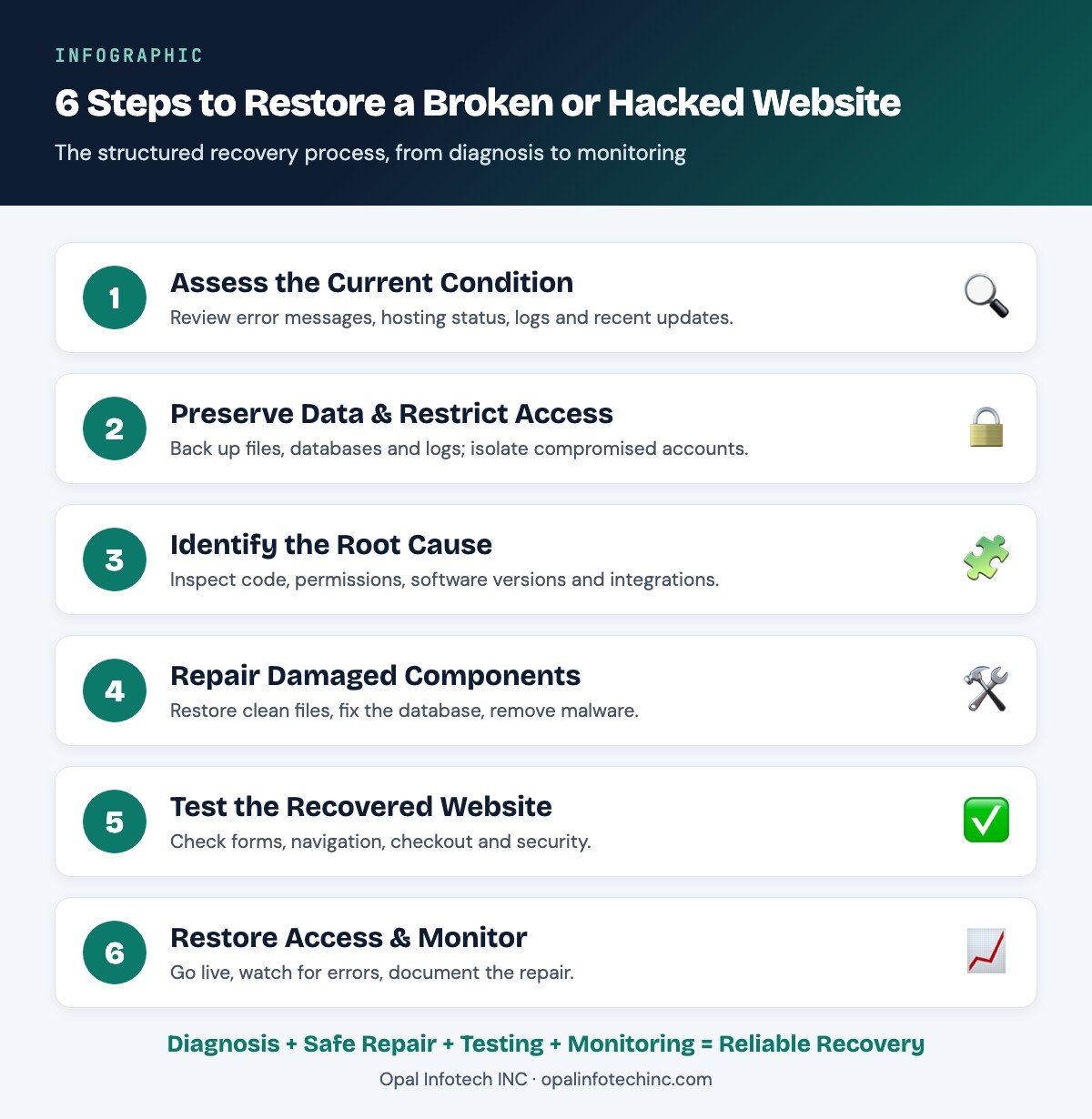
Emergency website repair services should follow an organized process that protects existing data while addressing the technical problem.
Step 1: Assess the Website's Current Condition
The first stage involves gathering essential information about the failure. Technical professionals may review error messages, hosting status, server logs, recent website updates and affected functions.
The investigation also determines whether the problem affects the complete website or specific components.
This initial assessment helps establish the scope of work and prioritize business-critical functionality.
Step 2: Preserve Website Data and Restrict Unsafe Access
Before making significant repairs, the website's current state should be preserved where feasible. This may include copies of application files, database records, configuration settings and relevant security logs.
If unauthorized access is suspected, the team may restrict affected accounts or isolate compromised services.
Preserving evidence can be important when customer data, financial records or security incidents are involved.
Step 3: Identify the Underlying Technical Issue
Repair methods depend on the root cause. For example, a plugin conflict requires a different approach from a compromised administrator account or damaged database.
Developers may inspect code changes, application dependencies, server permissions, software versions and external integrations.
Accurate diagnosis reduces the likelihood of restoring the website with the original problem still present.
Step 4: Repair Damaged Components
After determining the cause, the appropriate corrective work can begin. Depending on the website's condition, this may involve:
• Replacing damaged application files with trusted versions.
• Repairing broken database connections.
• Removing identified malicious scripts.
• Correcting configuration and permission errors.
• Restoring compatible plugins or application modules.
• Recovering content from verified backups.
• Fixing malfunctioning website forms or integrations.
The selected repair actions should reflect the actual failure rather than applying unnecessary changes to unaffected components.
Step 5: Test the Recovered Website
A website should undergo functional testing before the repair is considered complete. Testing may cover navigation, forms, user authentication, database operations, responsive layouts and relevant eCommerce workflows.
For online stores, checkout and payment integrations may require additional verification using safe test transactions.
Security checks are also important when the original problem involved suspicious activity.
Step 6: Restore Public Access and Monitor Performance
Once essential tests are completed, the website can be returned to normal public operation.
Technical monitoring can help identify recurring application errors, unexpected server responses or suspicious requests.
Documenting the cause and completed repairs also provides useful information for future maintenance.
Website Crash Recovery vs. Hacked Website Repair
Although both problems can make a website inaccessible, their recovery requirements are different. A website can also experience both technical and security failures simultaneously. For example, malicious code may overload server resources or damage application files, making a combined recovery approach necessary.
Main objective: Crash recovery aims to restore normal website functionality. Hacked website repair aims to remove unauthorized changes and secure access.
Common causes: Crashes typically stem from software conflicts, server errors and database failures. Hacks typically involve credential compromise, vulnerable software and malicious code.
Initial investigation: Crash recovery begins with application and infrastructure diagnostics. Hacked website repair begins with a security investigation and compromise assessment.
Typical repair work: Crash recovery involves configuration correction, code repair and backup restoration. Hacked website repair involves malware removal, clean-file restoration and security remediation.
Verification: Crash recovery is verified through functional and performance testing. Hacked website repair adds security validation to functional testing.
Follow-up priorities: After a crash, the focus is stability and compatibility monitoring. After a hack, the focus is security monitoring and vulnerability management.
Understanding which situation you are facing helps determine the right investigation path from the very start.
Important Considerations Before Restoring a Website Backup
Backups are an important component of website recovery, but restoring a backup without verification can introduce new problems. A backup may contain outdated business information, incompatible software versions or files that were already compromised.
Before restoration, technical teams should consider three important factors.
Backup integrity: Confirm that the required files and database records are accessible and suitable for restoration.
Recovery point: Identify when the backup was created and determine whether important changes occurred afterward.
Security condition: Where hacking is suspected, assess whether the backup contains malicious modifications or vulnerable components.
Testing backups in an isolated environment, when practical, can help identify problems before replacing production data. For websites processing orders or customer submissions, the recovery plan should also address records created after the selected backup.
How Emergency Website Repair Supports Business Continuity
The impact of a website failure depends on how the business uses its online platform. A brochure website may primarily lose access to inquiries and company information, while an eCommerce platform may experience interruptions to ordering and payment processing.
Different business functions therefore require different recovery priorities.
Restoring Customer Communication
Broken inquiry forms, contact pages and appointment systems can prevent potential customers from contacting the business.
Testing these functions helps confirm that submitted information reaches its intended destination.
Recovering eCommerce Operations
An online store may require verification of product availability, shopping carts, checkout functionality, order records and payment connections.
The recovery process should consider data consistency to reduce the risk of duplicate or missing transactions.
Maintaining Search Engine Accessibility
Extended website errors may affect how search engines access and process website pages. After restoration, technical checks can include HTTP response codes, redirects, XML sitemaps and indexing-related settings.
If a website received a security warning, the relevant review process may also be required after the issue is resolved.
Supporting Internal Business Workflows
Some websites connect directly with inventory systems, customer databases or external business applications. Repairing the website interface alone may not restore these connected processes.
Testing integrations helps verify whether information is moving correctly between systems.
What Factors Affect Emergency Website Repair Costs?
The cost of repairing a website depends on the technical issue and the resources required to resolve it. Two websites displaying similar error messages may require very different levels of investigation.
Extent of technical damage: A minor configuration correction may involve limited work, while database corruption or extensive file damage can require additional recovery procedures.
Website platform and customization: Standard CMS installations and heavily customized applications have different troubleshooting requirements. Custom integrations may require developers with familiarity with the underlying code.
Availability of usable backups: Reliable backups can simplify certain restoration tasks. Missing or compromised backups may require additional work to reconstruct website components.
Security incident complexity: A confirmed compromise may require malware investigation, access reviews, vulnerability remediation and further security testing.
Businesses should request a clear explanation of the proposed repair scope, expected deliverables and any conditions that may affect the final cost.
Preventive Website Maintenance After an Emergency Repair
Restoring website functionality addresses the immediate issue. Ongoing maintenance helps reduce avoidable technical failures and improves recovery readiness. A practical maintenance plan should reflect the website's technology, traffic, integrations and business requirements.
Regular Application and Security Updates
Content management systems, plugins, frameworks and dependencies should be reviewed for available security updates.
Updates should be tested for compatibility where appropriate, particularly on websites with customized functions.
Scheduled Backups and Recovery Testing
Backup frequency should reflect how often important website information changes. Business-critical systems may need more frequent backups than websites containing mostly static content. Periodic restoration tests help confirm whether stored backups can actually support recovery.
Website Uptime Monitoring
Automated monitoring can detect access failures and alert responsible personnel when defined conditions occur.
Monitoring does not prevent all downtime, but it can improve visibility into technical problems.
Website Security Reviews
Periodic reviews may include account permissions, authentication settings, file integrity, vulnerable software and suspicious activity. Access should be limited to users and services that require it.
Performance and Integration Checks
Website maintenance should also include testing important customer journeys, application performance and connected services.
This is especially relevant after changes to hosting environments, APIs or website functionality.
How to Choose a Website Repair Service Provider
Website troubleshooting can involve several interconnected technologies, including application development, hosting, databases, security configuration and third-party integrations. A repair team should be able to investigate these components systematically rather than concentrating only on visible page errors.
Before selecting a provider, businesses should consider its experience with the relevant website platform and whether it can explain the proposed recovery approach.
Communication procedures are equally important. A technical team should identify the main issue, explain the intended changes and clarify whether any functions or data remain at risk. Businesses should also ask about post-repair testing, backup handling, security practices and documentation of completed work. Recovery times depend on the extent of damage, available technical access, backup condition and complexity of the website.
About Opal Infotech INC
Opal Infotech INC provides website design, web development, website maintenance and digital marketing services for businesses seeking technical support and ongoing website improvements.
Our website-related services can support the investigation and correction of technical errors, application issues, maintenance requirements and website functionality problems. We approach website troubleshooting by considering the underlying technology, business requirements and important customer-facing functions.
Beyond immediate repair requirements, our team can assist businesses with website updates, redesign projects, technical improvements and longer-term maintenance planning.
Conclusion
Website failures can originate from several technical or security issues, and effective recovery begins with identifying the actual cause. Emergency website repair services should prioritize data preservation, accurate diagnosis, appropriate technical corrections and verification of business-critical functions.
A structured recovery approach also helps businesses understand what happened and which maintenance activities may reduce similar problems in the future.
Need Help With a Website Crash or Suspected Security Problem?
Contact Opal Infotech INC to discuss your website's condition, technical support requirements and available repair options.
Contact Opal Infotech INC for Website RepairFrequently Asked Questions
What are emergency website repair services?
Emergency website repair services involve diagnosing and addressing technical issues that interrupt website accessibility, security or essential functionality. Depending on the problem, the work may include application debugging, malware removal, database recovery, configuration repair and functional testing.
Can a crashed website be restored without losing data?
In some cases, a website can be repaired without losing data. The outcome depends on the type of failure, condition of the database, available backups and changes made during the incident. Important information should be preserved before major restoration activities whenever feasible.
How do I know whether my website has been hacked?
Possible indicators include unknown redirects, unexpected administrator accounts, modified website content, suspicious files or browser security warnings. These symptoms require investigation because some may also result from ordinary technical errors.
How long does website crash recovery take?
Recovery time varies according to the issue's complexity. A configuration error may require relatively limited corrective work, while significant database damage or a cybersecurity incident may involve extensive investigation, repair and testing.
Is website malware removal enough to secure a hacked website?
Not necessarily. Removing malicious files addresses identified harmful content, but the original access method may remain available. Appropriate recovery may also require software updates, credential changes, access reviews and vulnerability remediation.
What information should I provide to a website repair agency?
Useful information includes the website URL, affected functions, error screenshots, approximate time the issue began, recent website changes and available hosting or administrative access details. Sensitive credentials should only be shared through an approved secure method.
Can website downtime affect SEO performance?
Yes. Persistent server errors or inaccessible pages can affect search engine crawling and indexing. The actual impact depends on the outage duration, affected URLs, server responses and search engine activity during the incident.
Should I restore an old backup immediately after a website hack?
Restoration should be planned carefully. An old backup may contain the original vulnerability or malicious code, and replacing the database could remove newer business records. Backup integrity, security condition and recovery points should be verified before restoration.
Ready to Get Your Website Back on Track?
Discuss your website's condition with Opal Infotech INC and take the next step towards a faster, safer recovery.
Get Emergency Website Repair HelpBeyond emergency repair, Opal Infotech INC offers a comprehensive portfolio of digital services, including website design and redesign, web development across various platforms, AI SEO, Google paid campaign management, website maintenance, mobile app development and maintenance, AI chatbot development and AI integrations. Our team brings together digital marketing, website expertise and AI-driven solutions to help businesses strengthen their online presence, improve customer experiences and support their evolving digital requirements.